
Vendor sources and our tests are labelled separately. Independent tests that have not been run are not implied.

Is this edition right for your task?
- Fits
- A browser-based collection of PDF utilities.
- Main limit
- Online processing uploads files to PDF24 servers.
- Evidence
- Scoped original outcomes plus documented claims
This record combines scoped original tests with vendor documentation. Review the exact tested environment and limitations below. Test non-sensitive copies of your own files before switching. Platform support does not establish support for every operating system version.
- Edition
- Online Tools
- Platforms
- Browser
- Installation
- web
- Source-identified version
- Not recorded
- Last original test
- 3 Oct 2026
- Version tested
- See exact versions in the task results below
Evidence recheck in progress
Previous evidence is retained. A monitoring alert is not proof that the previous fact is wrong. Only fields marked “Recheck required” are withheld from tested matches or affected cost estimates.
- Read scanned text (OCR), Merge & organize pages, Offline requirements · Source review pending; no decision hold
Source content changed. Compare the before/after excerpt and verify affected fields before restoring eligibility.
Opened: 19 Sept 2026 · Changed source - Edition-wide source scope, Price and billing, Offline requirements · Source review pending; no decision hold
Source content changed. Compare the before/after excerpt and verify affected fields before restoring eligibility.
Opened: 19 Sept 2026 · Changed source - Edit existing text, Annotate & sign · Source review pending; no decision hold
Source content changed. Compare the before/after excerpt and verify affected fields before restoring eligibility.
Opened: 19 Sept 2026 · Changed source - Create fillable forms · Source review pending; no decision hold
Source content changed. Compare the before/after excerpt and verify affected fields before restoring eligibility.
Opened: 19 Sept 2026 · Changed source - Read scanned text (OCR), Merge & organize pages, Offline requirements · Source review pending; no decision hold
Source content changed. Compare the before/after excerpt and verify affected fields before restoring eligibility.
Opened: 27 Sept 2026 · Changed source - Edition-wide source scope, Price and billing, Offline requirements · Source review pending; no decision hold
Source content changed. Compare the before/after excerpt and verify affected fields before restoring eligibility.
Opened: 27 Sept 2026 · Changed source - Edit existing text, Annotate & sign · Source review pending; no decision hold
Source content changed. Compare the before/after excerpt and verify affected fields before restoring eligibility.
Opened: 27 Sept 2026 · Changed source - Create fillable forms · Source review pending; no decision hold
Source content changed. Compare the before/after excerpt and verify affected fields before restoring eligibility.
Opened: 27 Sept 2026 · Changed source - Read scanned text (OCR), Merge & organize pages, Offline requirements · Source review pending; no decision hold
Source content changed. Compare the before/after excerpt and verify affected fields before restoring eligibility.
Opened: 4 Oct 2026 · Changed source - Edit existing text, Annotate & sign · Source review pending; no decision hold
Source content changed. Compare the before/after excerpt and verify affected fields before restoring eligibility.
Opened: 4 Oct 2026 · Changed source - Create fillable forms · Source review pending; no decision hold
Source content changed. Compare the before/after excerpt and verify affected fields before restoring eligibility.
Opened: 4 Oct 2026 · Changed source - Read scanned text (OCR), Merge & organize pages, Offline requirements · Source review pending; no decision hold
Source content changed. Compare the before/after excerpt and verify affected fields before restoring eligibility.
Opened: 11 Oct 2026 · Changed source - Edit existing text, Annotate & sign · Source review pending; no decision hold
Source content changed. Compare the before/after excerpt and verify affected fields before restoring eligibility.
Opened: 11 Oct 2026 · Changed source - Create fillable forms · Source review pending; no decision hold
Source content changed. Compare the before/after excerpt and verify affected fields before restoring eligibility.
Opened: 11 Oct 2026 · Changed source - Read scanned text (OCR), Merge & organize pages, Offline requirements · Source review pending; no decision hold
Source content changed. Compare the before/after excerpt and verify affected fields before restoring eligibility.
Opened: 18 Oct 2026 · Changed source - Edition-wide source scope, Price and billing, Offline requirements · Source review pending; no decision hold
Source content changed. Compare the before/after excerpt and verify affected fields before restoring eligibility.
Opened: 18 Oct 2026 · Changed source - Edit existing text, Annotate & sign · Source review pending; no decision hold
Source content changed. Compare the before/after excerpt and verify affected fields before restoring eligibility.
Opened: 18 Oct 2026 · Changed source - Create fillable forms · Source review pending; no decision hold
Source content changed. Compare the before/after excerpt and verify affected fields before restoring eligibility.
Opened: 18 Oct 2026 · Changed source
Each capability row retains its last recorded source/test date. Other fields remain governed by their own evidence and freshness. No completion date is promised.
Capability evidence
Official sources establish advertised availability and limits. A recorded task test separately establishes what worked in a specific environment.
Edit existing text
Not supportedAdds new text and drawings. The documented workaround for changing existing text is conversion to Word, editing there, then converting back.
Official source ↗Source checked: 12 Sept 2026Read scanned text (OCR)
Available · official sourceThe online tools include OCR; documents are processed on servers.
Official source ↗Source checked: 12 Sept 2026Create fillable forms
Available · official sourceCreates fillable form fields including text boxes, checkboxes and dropdowns.
Official source ↗Source checked: 12 Sept 2026Fill existing forms
Source neededAnnotate & sign
Available · official sourceNew text, drawing and image annotations are documented; signature tools are also listed in the PDF24 tool collection.
Official source ↗Source checked: 12 Sept 2026Merge & organize pages
Available · official sourceThe PDF24 tool collection provides online merge and page tools.
Official source ↗Source checked: 12 Sept 2026Permanently redact text
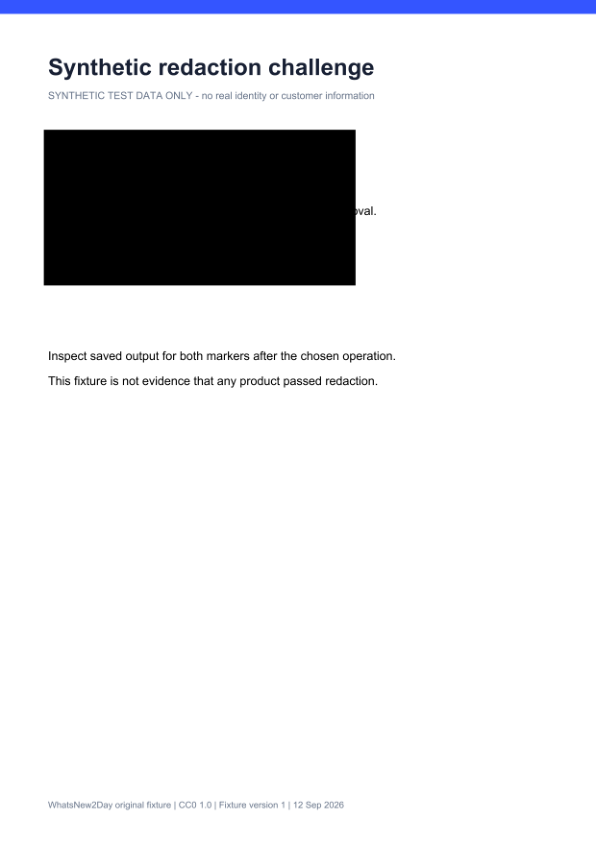
Passed in recorded scopePASS for this one-page synthetic fixture and Browser workflow only. Neither W2D-VISIBLE-742913 nor W2D-HIDDEN-583201 was recoverable from extracted text or decoded streams. Visual inspection confirms the marked region is black. Output is one raster image (1240 × 1753); the page content only paints that image, with no text layer, annotations or embedded files. Tradeoff: all page text lost searchability. Original document metadata remains. Does not establish metadata sanitization, arbitrary PDF safety, Windows Creator behavior, other versions, offline use, or handling of attachments, layers, forms or signatures.
Original test evidence ↗Test performed: 12 Sept 2026Scoped task evidence recordedNo hands-on result is implied by an official-source check. Unresolved outcomes remain excluded from tested recommendations.
Scoped original task results
Permanently redact text · Pass
Browser · OS Remote Chrome session; OS build not independently established · app Online web app; vendor build number not exposed
Remote browser environment; hardware not exposed · 12 Sept 2026
Steps performed: Opened PDF24 Online Redact PDF, accepted the use terms with owner authorization and uploaded the original CC0 synthetic pdf-redaction-v1 fixture. Selected Add shape > Rectangle. Resized the opaque black rectangle to cover both the visible marker and the known white-on-white hidden marker area. Used Save PDF and downloaded the generated result. Rendered the output with MuPDF, extracted text with Poppler and MuPDF, and inspected decoded PDF streams, page resources, annotations and embedded files.
Observed result and limits: PASS for this one-page synthetic fixture and Browser workflow only. Neither W2D-VISIBLE-742913 nor W2D-HIDDEN-583201 was recoverable from extracted text or decoded streams. Visual inspection confirms the marked region is black. Output is one raster image (1240 × 1753); the page content only paints that image, with no text layer, annotations or embedded files. Tradeoff: all page text lost searchability. Original document metadata remains. Does not establish metadata sanitization, arbitrary PDF safety, Windows Creator behavior, other versions, offline use, or handling of attachments, layers, forms or signatures.
Fixture: Redaction extraction challenge
Fixture checksum and test ID
SHA-256: d253a9453b0ea419ac20677d524fe6322e37aa494cdf417b52147d219b411df9
Test: pdf24-online-redaction-20260912-v1
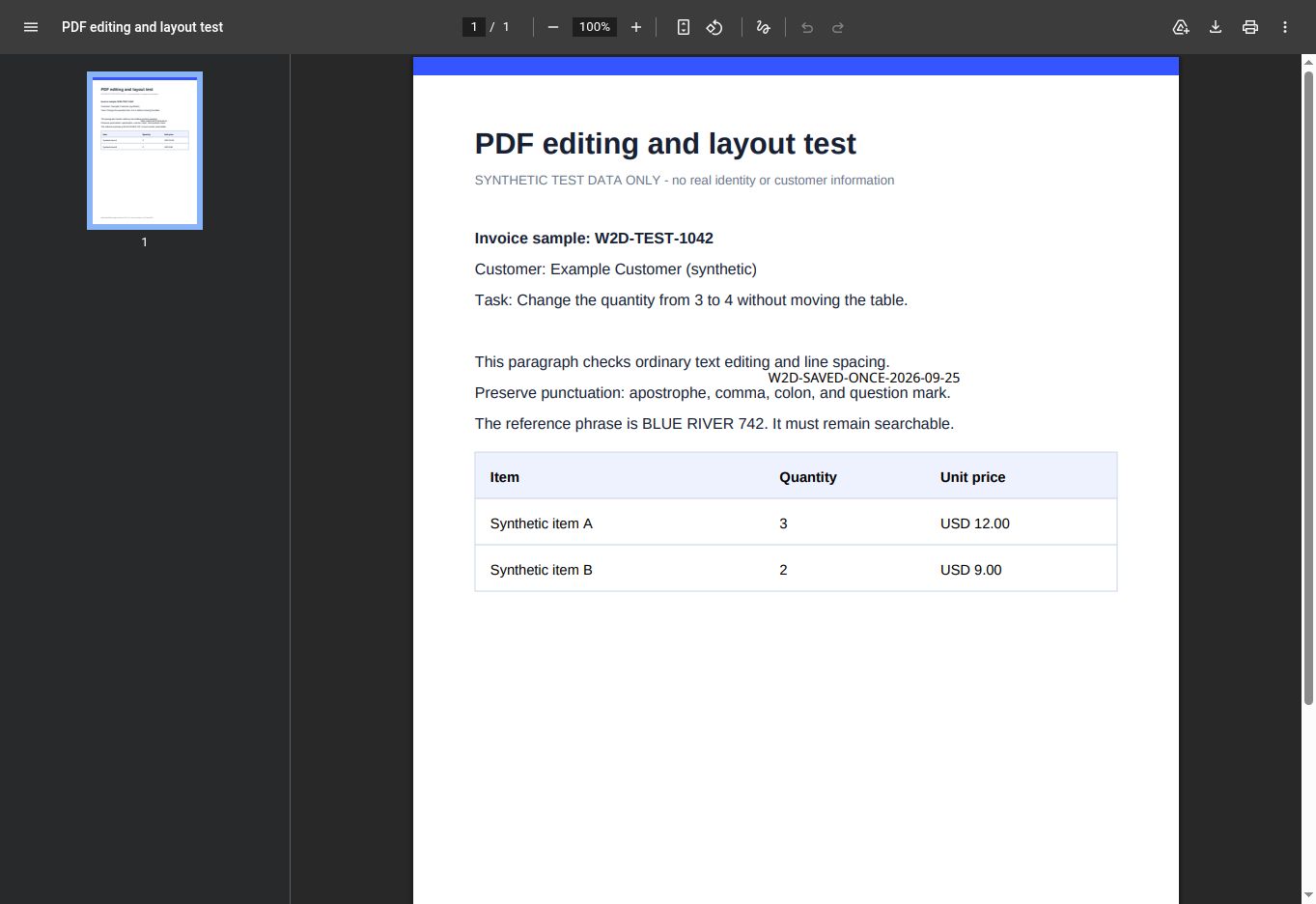
Did one Save keep an added text marker?
Yes, in our one-page synthetic test. The downloaded PDF visibly and textually contained W2D-SAVED-ONCE-2026-09-25 after one Save action. But the original table value stayed at 3: this was an added text overlay, not editing existing PDF text.
PDF24 Online OCR: one synthetic OCR output
This online OCR tool returned a downloaded PDF with extractable text and matches for three test strings. The extracted symbol rows differed from the source. Proofreading was still needed.
One clean, single-page English fixture; one Browser run per tool. No accuracy percentage, overall winner, editable-document result, desktop result or tested exact match is established.
Original PNG uploaded directly to PDF24 Online OCR. This is the Online OCR tool only. No PDF24 Creator, offline or existing-text editing outcome is established.
Compare the source, outputs, settings and limitsDownload the original OCR PDFInspect the test record and checksums
Offline use and network dependencies
Setup, activation, local work and cloud services can have different requirements.
Install / first load needs internet
Yes · documentedThe first browser visit and online processing require internet; there is no desktop installation in this edition.
Official source ↗Source checked: 12 Sept 2026Account / license activation needs internet
No · documentedThe free online tools do not require a paid license. Loading the website still needs internet.
Official source ↗Source checked: 12 Sept 2026Core task works locally
No · documentedOnline tools process documents on servers. Use Creator for the documented local Windows workflow.
Official source ↗Source checked: 12 Sept 2026Cloud features or dependencies
Yes · documentedServer processing is a required dependency of the online edition.
Official source ↗Source checked: 12 Sept 2026A complete disconnected installation, activation and task run has not been independently tested.