

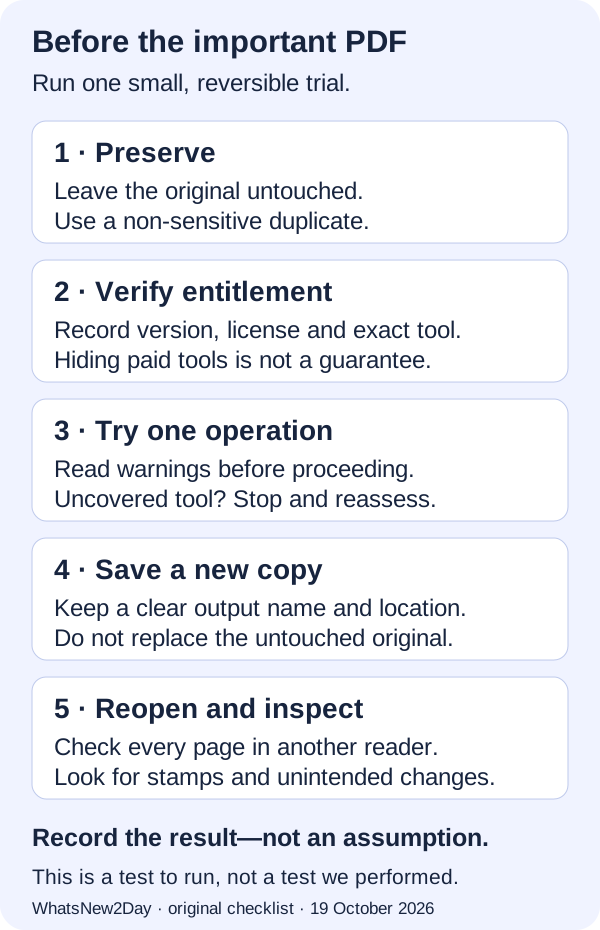
| Record | What to write down |
|---|---|
| Environment | Editor version/build, Windows version and license edition/status |
| Operation | The exact command and whether a license/demo warning appeared |
| Saved file | New filename, page count and visible changes |
| Reopen check | Reader/version, every-page inspection and result |
| Decision | Keep the tested workflow, investigate, or restore the untouched original |
Reversible PDF save checklist
0 of 7 complete · saved on this device
Vendor: experiment on copies, not originals · official help checked 2026-10-19
Vendor: license and edition mismatch causes · official help checked 2026-10-19
Vendor: hide licensed tools, with limitations · official help checked 2026-10-19
Vendor: saves, exports and optimization can add stamps · official help checked 2026-10-19
What the free download actually permits
The current official download page says more than 70% of Editor features do not require a license; the remaining features add watermarks when used without one. That is a feature-level distinction, not a promise that any PDF task is free. On 19 October 2026 the page listed Editor and Editor Plus 11.1.0.0, updated 25 September 2026, for Windows 10 and later. This is the source-listed version, not a version we installed or tested.
Hide licensed tools—but keep checking the output
The vendor’s KB229 instructions for Editor are: open Help → License Key, select “Hide all licensed features from toolbars and menus,” then choose Apply and OK. The same page warns that these steps do not prevent all demo watermarks and do not change the behavior of separate products such as PDF-Tools or PDF-XChange printers. If your managed installation does not expose the setting, use your administrator’s supported process. Do not assume a missing checkbox proves a feature is free.
Why a paid license can still produce a demo stamp
Check both the installed package and the entitlement. KB186 identifies an unapplied or incorrect key as a possible cause. It also distinguishes Editor from Editor Plus/PRO features such as Enhanced OCR, fillable-form creation and dynamic stamps. Verify the exact task against your license rather than treating “paid” as an all-features pass. If a previously working installation changes behavior, record its build and license status for support; that observation alone does not establish a vendor defect.
Use a practice file and one task at a time
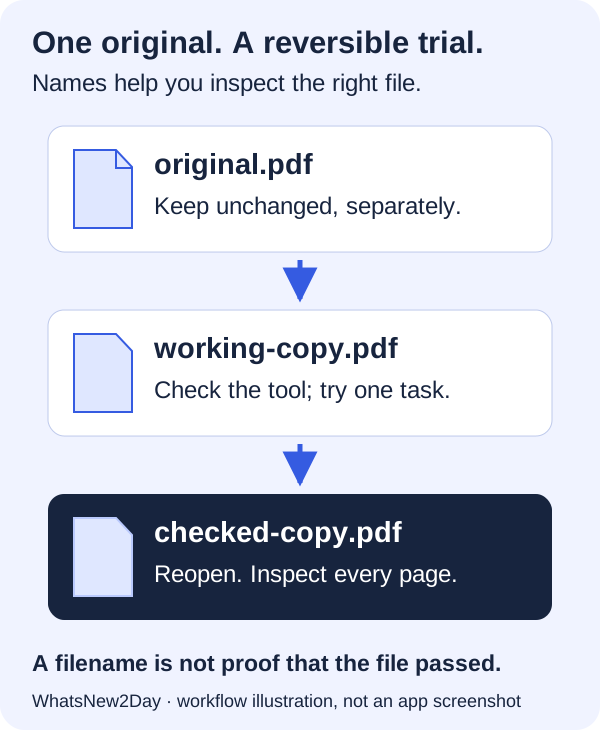
Our Testing page already provides original CC0 synthetic PDF fixtures. Start with the layout fixture for a non-sensitive practice document, or the form fixture when your task is filling fields. Fixture availability is not proof that PDF-XChange passes a test. For your trial, write down one operation, its expected visible result, the output filename and the reader used to inspect it. Combining several unfamiliar tools in the first trial makes a later stamp or changed page harder to trace.
Already saved a stamped file? Preserve your recovery options
First look for the untouched original or a genuine backup. Opening a clean backup lets you repeat the work using a supported workflow; it does not remove a stamp from the affected file. The vendor’s documented stamp-removal route requires a valid license. Follow its official recovery instructions if applicable. We do not claim that closing a file, changing its name, undoing an edit or hiding licensed tools removes an already-saved stamp.
Check the document, not just the watermark
A file without a visible demo stamp can still contain the wrong edit, missing comments or altered layout. Compare page count and the intended content, then test any forms, links, accessibility or signatures your actual workflow relies on. Our checklist is a basic acceptance record, not a security audit or proof of signature validity. Keep protected, signed and confidential originals out of an exploratory editing trial.
Scope: documentation and a checklist, not hands-on testing
We reviewed the official pages on 19 October 2026. KB229 itself is dated 21 November 2023 and KB186 is dated 14 May 2025; those vendor dates have not been rewritten as today. We did not run the Windows application, activate a license, edit a PDF in Editor or measure a successful export for this guide. Both visuals are original workflow illustrations, not screenshots. Current prices and comparative software quality are outside its scope.
Inspect the exact editions
Open the full evidence record before choosing. A documented candidate is not a completed migration test.
References and scope
Official help checked 19 Oct 2026. Plan, role and region limits still apply; this is a planning checklist, not a completed migration.