

Remux and editor-handoff checklist
0 of 6 complete · saved on this device
OBS: manual remux steps · official help checked 2026-10-17
OBS: audio-track routing and playback · official help checked 2026-10-17
OBS: automatic remux setting · official help checked 2026-10-17
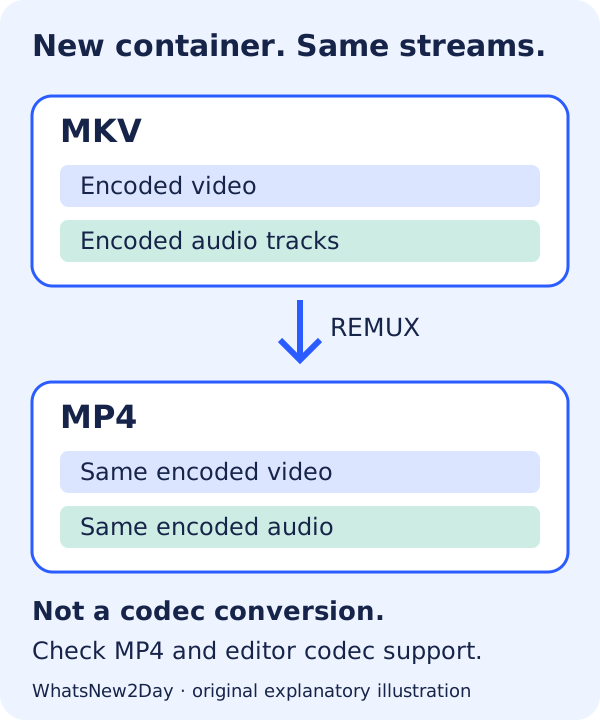
Remuxing is not re-encoding
MKV and MP4 describe containers. H.264, HEVC and AV1 describe video codecs. Moving a supported encoded stream into MP4 does not turn HEVC into H.264, lower the resolution or repair a missing microphone recording. If the editor rejects the codec rather than the container, investigate its exact codec support; a separate transcode may be needed. Do not simply rename .mkv to .mp4.
A three-track handoff example
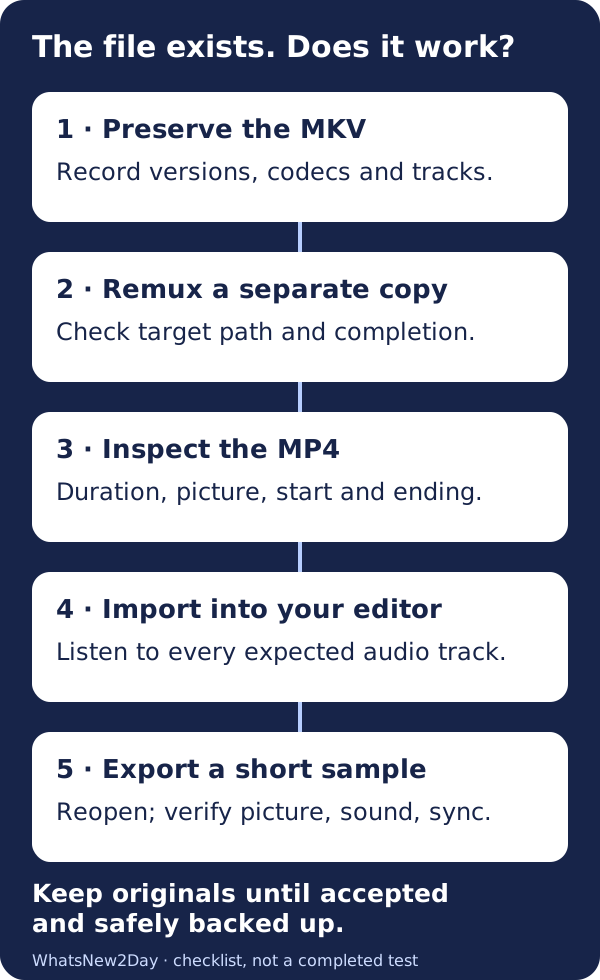
Suppose your intended recording has a complete mix on track 1, microphone on track 2 and desktop audio on track 3. Write those expectations down before importing. Hearing the microphone in a player does not establish that all three tracks exist or that the editor exposes them separately. This is an example checklist, not a recording we tested. OBS documents separate track selection and source routing; inspect both.
What if the MP4 still will not import?
Separate three questions: did remuxing finish, can the output be read, and does this editor support its codec and tracks? Keep the original, note the exact error and test a short non-sensitive clip with the same settings. Do not repeatedly process the only copy or upload confidential footage to a random converter. A successful completion message is not an editor-compatibility certificate.
Hybrid MP4 changes the old blanket advice
OBS introduced Hybrid MP4 in version 30.2. It writes a recoverable fragmented file and finalizes it for ordinary MP4 handling when recording stops normally. That is different from traditional MP4 recording. Check the format actually selected in your installed OBS version; do not assume every file ending in .mp4 was written the same way. The official format pages contain evolving default descriptions, so this guide does not prescribe a universal default.
Choose the container around the codec
OBS documents different codec support for Hybrid MP4 and Hybrid MOV. ProRes is supported in Hybrid MOV, not Hybrid MP4. It also warns that PCM audio in MP4 is not supported by every application. An MP4 extension alone therefore cannot establish a working editing workflow. Use the official format table and your editor’s documentation for the actual combination.
Automatic remux is a convenience, not a backup
OBS documents Automatically remux to mp4 under Settings → Advanced. It starts after recording stops. Enable it only after your sample passes the handoff checks, and account for the extra output file in storage planning. A second container on the same disk is not protection against disk loss.
Scope: documented workflow, not our hands-on result
Official OBS documentation was reviewed on 17 October 2026. We did not run OBS or a video editor for this article and do not claim a measured processing speed, lossless editor export, crash-recovery test or universal compatibility. The illustrations are original explanations, not screenshots of a tested application. A damaged recording is a separate recovery problem; remuxing is not a promise to reconstruct missing data.
Inspect the exact editions
Open the full evidence record before choosing. A documented candidate is not a completed migration test.
References and scope
Official help checked 17 Oct 2026. Plan, role and region limits still apply; this is a planning checklist, not a completed migration.